Lightweight iTunes controller

QuickTunes by Dbachrach is a simple utility for Mac users who want quick control over iTunes playback without opening the full app. Running discreetly in the menu bar, it provides instant access to basic controls and track info, making it a handy add-on for desktop music listeners.

Top Recommended Alternative

Control iTunes effortlessly

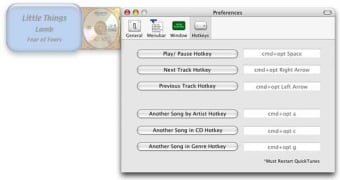
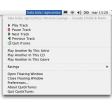
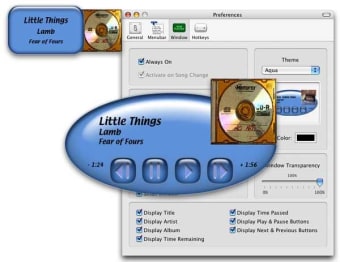
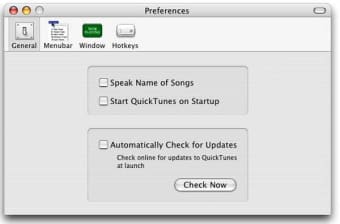
QuickTunes integrates with iTunes and some versions of the Music app to provide playback control directly from the Mac menu bar. Users can pause or skip tracks, rate songs, and view basic track details like title, artist, album, and artwork—all without opening iTunes. For added convenience, the app supports customizable keyboard shortcuts, allowing users to control playback quickly through key combinations like play/pause or next track.

This utility focuses entirely on ease of access rather than extensive features. It doesn’t support music streaming platforms or library management tools. Instead, it acts as a lightweight remote for local music playback. The interface is compact and minimal, showing a drop-down menu rather than a full window. Album art is included to add a visual element, but otherwise, the app stays out of the way while handling core playback functions effectively.

Final thoughts

QuickTunes offers a streamlined way to control iTunes directly from the Mac menu bar. Instead of modern extras, it prioritizes quick, dependable playback functions. Though it lacks features for streaming services or music organization, it handles its specific role simply and effectively.
  • Pros

    • Lightweight and unobtrusive
    • Displays song info and cover art
    • Customizable keyboard shortcuts
    • No setup required for iTunes users
  • Cons

    • No music library management
    • Lacks support for modern streaming apps
    • Minimal interface with limited functionality
 0/3

App specs

  • License

    Free

  • Version

    2.3

  • Latest update

  • Platform

    Mac

  • OS

    Mac OS X

  • Language

    English

  • Downloads

    3K

  • Size

    800.48 KB

  • Developer

Program available in other languages


User reviews about QuickTunes

4.5

1 reviews

Add review

Main reviews for you

  • Anonymous user

    Fantastic. Seriously. I do have one tiny complaint.. The thing is exactly what you want it to be. I most appreciate the keyboard shortcuts to play, pause, and skip tracks from whatever program i'm working in, and that I can always look in the menu bar to see what's playing.My one complaint is getting the program to run. I launch it from Spotlight on average 2-3 times before anything happens or responds or anything. I'm not being impatient or anything. I'll give it a minute or two to show up, and then nothing. So i just have to do it again. And often a third time. I wish there was a way to have it start when I want it to.

More

You may also like

Explore Apps

Latest articles

Laws concerning the use of this software vary from country to country. We do not encourage or condone the use of this program if it is in violation of these laws.
Softonic

Is QuickTunes safe?

100/100

Score result: Clean

This file passed a comprehensive security scan using VirusTotal technology. It is safe to download.

  • Virus free
  • Spyware free
  • Malware free
  • Verified by Security Partners

    VirusTotal logo

Scan Info

Last scan
Saturday, December 30, 2023
Scan provider
VirusTotal · Full report

File Integrity

File
QuickTunes.dmg
SHA256
a59d3b5077a1535a7df5fd019ceef8ddb2ec199f96bc084bc4dcb803b9e15d0c
SHA1
905bc563682123d037d90c42e4ff2a07d35d990a

Softonic security commitment

QuickTunes has been thoroughly scanned by our advanced security systems and verified by industry-leading partners. This file comes from the official developer and has passed all our security checks, showing no signs of viruses, malware, or spyware. For more information, visit our Security and Trust Center